Easy Answers - Insights Page
Breadcrumbs

Quick Insights for Statistical Tests

Intended audience: end-users data science developers

AO Easy Answers: 4.5

Overview

Quick Insights can be generated at runtime by the user from Apps on the Easy Answers Results page, or from a scheduled task created by the Solution Developer using the Insight Composer in the AO Platform. This topic covers the Quick Insights relating to Categorical Data.


What and Why?

Test for Rates

What?

Why?

  • A statistical method to analyze SUCCESS/FAILURE data and compare rates using Bayesian inference.​

  • DATA TYPE: COUNT DATA​

    • Successes: How many converted, passed, clicked, responded?​

    • Total Trials: How many visitors, units, emails, patients?​

    • Result: Success RATE (probability between 0 and 1)​

  • KEY OUTPUT

    • Posterior distribution of each group's success rate (theta).​

    • Credible intervals (like confidence intervals, but interpretable!). ​

    • Direct probability statements: P(Treatment > Control) = 94%.​

  • INTUITIVE RESULTS ("There's a 94% probability that the new landing page beats the old one “)​

  • UNCERTAINTY QUANTIFICATION (Get full distribution of possible success rates)​

  • WORKS WITH SMALL SAMPLES (Partial pooling borrows strength across groups)​

  • FLEXIBLE POOLING STRATEGIES​

    • Complete: Single rate (benchmark testing)​

    • Partial: Related groups (categories, regions)​

    • No Pooling: Independent groups (drugs, treatments)​

Test for Means

What?

Why?

  • A statistical method to compare means across groups using Bayesian inference.​

  • KEY OUTPUT

    • Posterior distribution of each group's mean ​

    • Credible intervals (like confidence intervals, but interpretable!) ​

    • Direct probability statements: P(Group A > Group B) = 92%​

  • INTUITIVE RESULTS ("There's an 87% probability that Region A outperforms Region B“)​

  • UNCERTAINTY QUANTIFICATION (Get full distribution, not just point estimate)​

  • WORKS WITH SMALL SAMPLES (Borrows strength across groups (partial pooling))​

  • HANDLES REAL-WORLD DATA ​

    • Normal: Clean continuous data​

    • Robust: Data with outliers​

    • Poisson: Count data​

  • FLEXIBLE POOLING STRATEGIES​

    • Partial: Related groups (regions, time periods)​

    • No Pooling: Independent groups (different products)​

Test for Proportions

What?

Why?

  • A statistical method to analyze CATEGORICAL COUNT DATA and compare PROPORTIONS across multiple categories usingBayesian inference.​

  • DATA TYPE: CATEGORY COUNTS​

    • Multiple categories (3 or more typically).​

    • Counts in each category (non-negative integers).​

    • Result: Proportions that SUM TO 1.​

  • KEY OUTPUT

    • Posterior distribution of each category's proportion (theta).​

    • Proportions ALWAYS sum to 1 (Dirichlet distribution).​

  • INTUITIVE RESULTS ("Mobile traffic is 55% with 95% CI [53%, 57%]" )​

  • UNCERTAINTY QUANTIFICATION (Get full distribution for each category proportion)​

  • WORKS WITH SMALL SAMPLES (Bayesian inference handles small counts gracefully)​

  • HIERARCHICAL MODELING​

    • Compare related groups (partial pooling)​

    • Compare independent groups (no pooling)​

    • Single global estimate (complete pooling)​

  • MULTIPLE COMPARISON TYPES​

    • ONE-SAMPLE: Test if distribution matches expected​

    • HOMOGENEITY: Test if groups have same proportions​

    • INDEPENDENCE: Test if groups have different proportions​


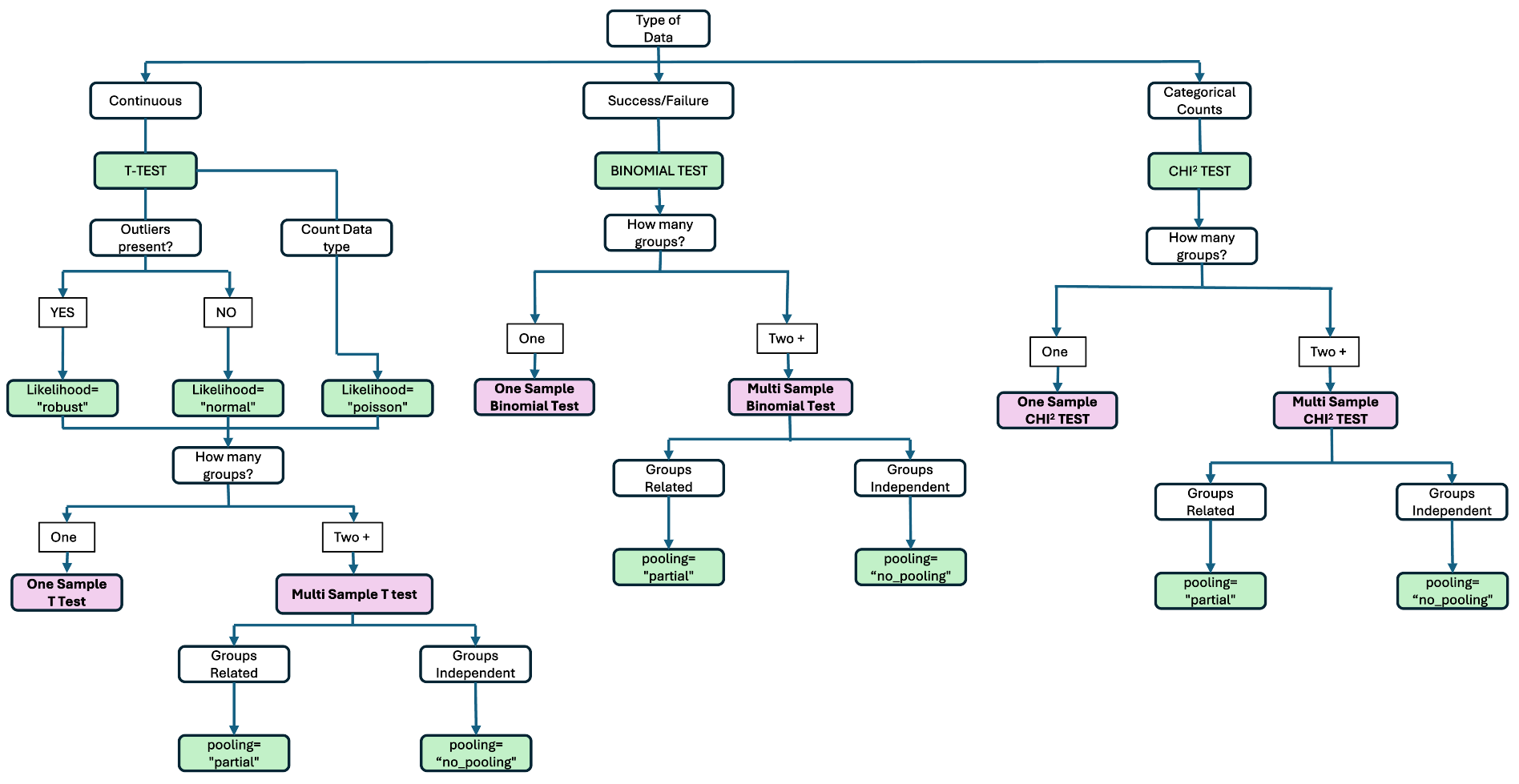
Configuration Flow

image-20251217-155046.png


Statistical Tests


Contact App Orchid | Disclaimer